

WP8548 & WP75xx Firmware Release 15 Components
- Jan 11, 2018
- Author: Sierra Wireless
- Version: 15
This page describes in detail the components included with the Firmware Release, how to build your own custom device image based on Release 15 components and how to download it on your product.
The Firmware and its components are mapped into the flash as follows:
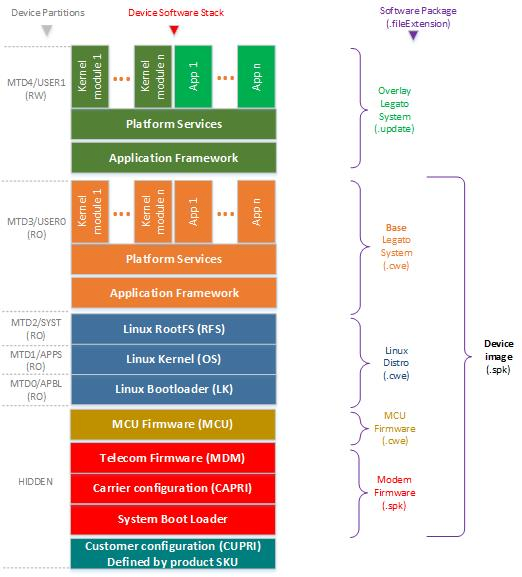
Release 15 Components
WP8548 & WP75xx Firmware Release 15 combined image
Note: If your carrier is not listed and you are unsure which Generic to use, check with your carrier.
| Components | Revision | Binaries | How to rebuild a custom Component ? |
| Modem Firmware (Generic — GCF) |
SWI9X15Y_07.12.14.00 / 001.034_000 |
Download |
Custom Modem Firmware can NOT be created by customers |
| Modem Firmware (Generic — PTCRB) |
SWI9X15Y_07.12.09.00 / 001.033_000 |
Download |
Custom Modem Firmware can NOT be created by customers |
| Modem Firmware (AT&T) |
SWI9X15Y_07.12.09.00 / 001.028_000 |
Download |
Custom Modem Firmware can NOT be created by customers |
| Modem Firmware (Sprint) |
SWI9X15Y_07.12.09.00 / 001.020_000 |
Download |
Custom Modem Firmware can NOT be created by customers |
| MCU Firmware |
002.004 |
Download |
Custom MCU Firmware can NOT be created by customers |
| Linux Distribution |
SWI9X15Y_07.12.14.00 |
Download |
Custom Linux Distribution can be built through Yocto by customers
|
| Base Legato System |
16.10.4 |
Download |
Custom Base Legato System can be built by customers
|
Rebuild Linux Distribution or/and Legato from source
In case where you need to rebuild either the Linux Distribution or Legato or both, you can use the following resources:
| Legato Source | Legato Distro Source | Linux Distro Licences |
Toolchain |
| 16.10.4 Source |
SWI9X15Y_07.12.14.00 Source (Based on Kernel 3.18 and Yocto 1.7) |
Open Source Licenses | 32-bit ToolChain 64-bit ToolChain |
The instructions to rebuild Legato are available on legato.io.
The instructions to rebuild the Linux Distribution through Yocto project are available here.
Build your custom Device Image
Once you have customized one or several of the components from source, or once you have created your own Base Legato System, it is time to assembly the components in one Device Image.
| Instructions for Developer Studio users (Linux, Windows) |
Follow the instructions from Build your own custom Device Image using Developer Studio. |
| Instructions for Linux CLI users (Linux) |
1. Install swicwe tool 2. To build your own combined image custom-firmware.spk from the following components:
you need to launch the following command line: |
Note 1: You may decide to generate a custom Device Image without the full list of components (e.g. without Modem Firmware or without the Linux Distribution). If you do so, when you will flash this image later, only the components included within the custom Device Image package will be updated, the others will remain untouched. By doing this, you shall insure that the untouched components are compliant with the ones you are updating through the custom Device Image.
Note 2: If your custom Device Image is including a Base Legato System, when you will flash this image later, the Overlay Legato System will be erased and reinitialized with the same content as the Base Legato System.
Flash your custom Device Image
After having created your own Device Image, you can load it on your target.
| Instructions for Developer Studio users (Linux, Windows) |
Follow the Custom Device Image Update Instructions with Developer Studio to install your own combined image created at previous step. |
| Instructions for Legato CLI users (Linux) |
1. Connect the mangOH USB cable to your host (or establish any IP connection with the target) 2. Open a terminal and execute the Legato command line: |
| Instructions with AirVantage IoT Cloud |
Follow the WP Series - AirVantage FOTA & SOTA Guidelines to create the AirVantage package for your custom Device Image, load it on AirVantage and use it to operate Firmware OTA. |
Recovery
In case of failure after having downloaded within the product an unstable custom device image, you can launch a Recovery Procedure to restore a stable firmware.
Tags
Related items
- WP8548 & WP75xx Firmware Release 15
This page describes the procedure to update WP8548 & WP75xx with the Firmware Release 15.
- WPFirmwareRelease History item
Available WP8548 & WP75xx Firmware Releases: WPx5xx Firmware Release 16.1/17 WPx5xx Firmware Release 16 WPx5xx Firmware Release 15 WPFirmwareRelease14 WPFirmwareRelease13.1 WPFirmwareRelease12.2 WPFirmwareRelease12 WPFirmwareRelease11 WPFirmwareRelease10 WPFirmwareRelease9