

Build your own Custom Device Image using Developer Studio
- May 30, 2017
- Author: Sierra Wireless
- Version: 1
Procedure to build your own Custom Device Image using Developer Studio
Check out our new IDE: Legato Plug-in for Visual Studio Code

This page describes the procedure to build your own Custom Device Image using Developer Studio.
1. Select in menu File > Export...
2. Select Developer Studio > Generate custom Legato Firmware Image, then click on Next
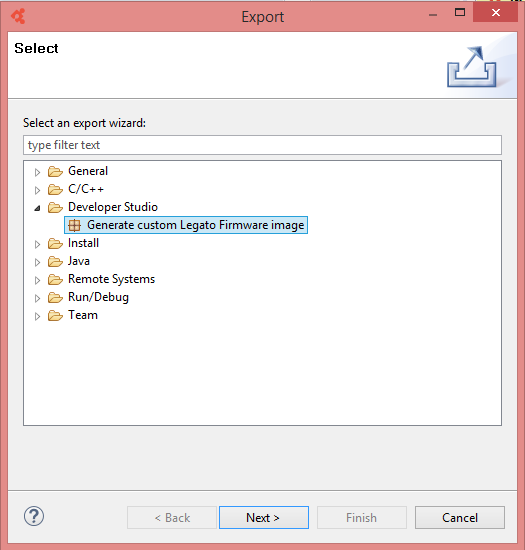
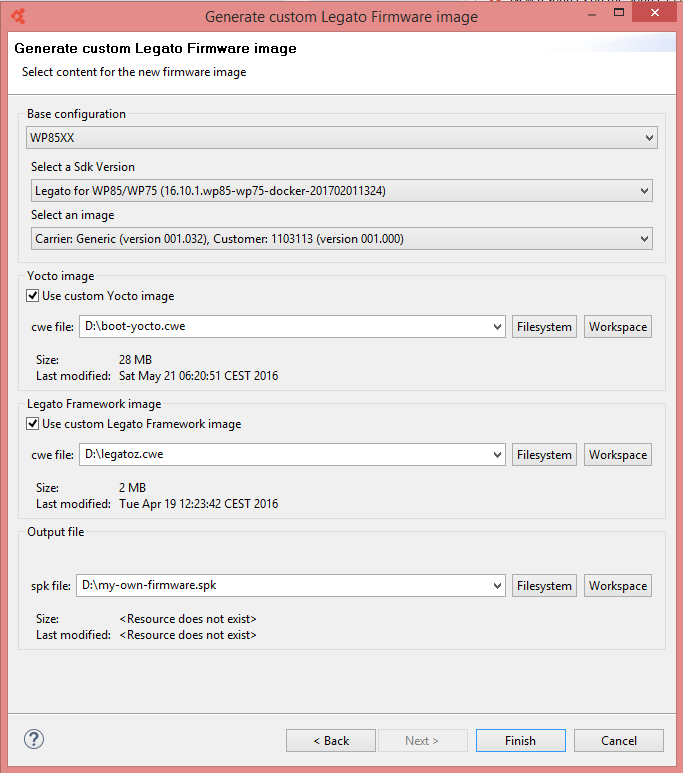
3. In the wizard:
- Select Base configuration, Legato sdk version and carrier that will be used as reference to generate your Custom Device Image
- If you want to overwrite the Linux Distribution by your own: Select Use custom Yocto Image and Browse to select your Linux Distribution file (boot-yocto.cwe in the example below)
- If you want to overwrite the Base Legato System by your own: Select Use custom Legato Framework Image and Browse to select your Base Legato System file (legatoz.cwe in the example below)
Then click Finish to create the custom Device Image file
Tags
Related items
- Developer Studio
Integrated Development Environment (IDE) for Legato