

Developer Studio
- Mar 7, 2018
- Author: Sierra Wireless
Integrated Development Environment (IDE) for Legato

Check out our new IDE: Legato Plug-in for Visual Studio Code
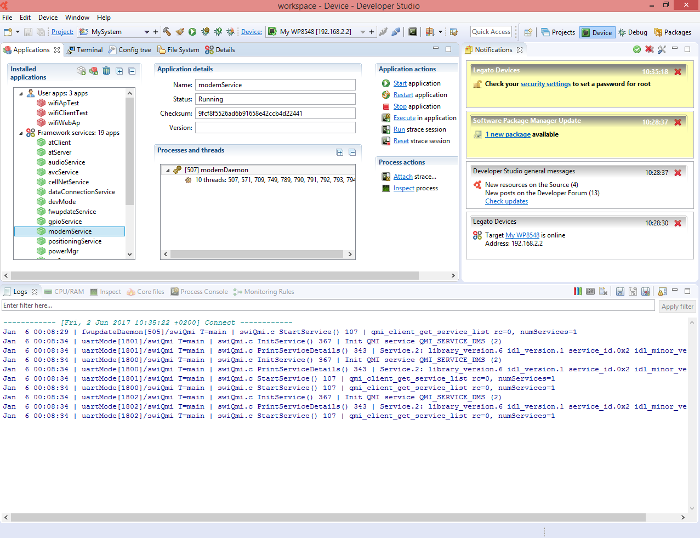
Developer Studio is an Integrated Development Environment (IDE) built on Eclipse. It allows developers to create Legato applications or rebuild the open source Legato application framework with an intuitive Graphical User Interface (GUI) running on Windows, Linux and MacOS hosts.
|
 |
| Minimum Configuration | Recommended Configuration | |||
| Hardware | CPU | Dual Core @ 2,6GHz | Quad Hyperthreaded Core (8x) @ 3,4GHz |
|
| RAM | 4 Go |
8 Go |
||
| Display | 19" (e.g. 1280x1024px) |
24" display (e.g. 1920x1080px) |
||
| Software | Linux |
Linux (32bits or 64 bits)
Java 8 (32bits or 64 bits)
|
||
| Windows | Windows (64 bits)
Java 8 (64 bits)
|
|||
| MAC OS | MAC OS (64 bits)
Java 8 (64 bits)
|
|||
Standard Installation
For Newbies, it is recommended to install the Legato SDK (Software Development Kit) that includes Developer Studio and also toolchain, drivers and embedded software package associated to the product. This installer is an all-in-one package allowing to simplify the procedure to get started on Sierra Wireless products:
| Product | Host | Download |
| WP8548 | WP750x | WP76xx | WP77xx | Linux | Legato SDK |
| Windows | Legato SDK |
Advanced Installations
The following installation procedures have the purpose of installing Developer Studio IDE in standalone without any additional deliverables such as drivers, toolchain or embedded software packages that could be installed separately.
Standalone Installation
For users who doesn't have the Eclipse Platform on host, this package is installing Developer Studio without any additional drivers, toolchain or embedded software packages.
| Installer | Notes |
|
| Linux (32bit) | Developer Studio for Linux 32 bit |
|
| Linux (64bit) | Developer Studio for Linux 64 bit |
|
| Windows | Developer Studio for Windows |
|
| MacOS | Developer Studio for MacOS |
Refer to bundled README.txt file to get more details on how to handle the installation |
Installation over an Eclipse platform
For Eclipse Platform users, it is possible to install Developer Studio as a set of plug-ins over an existing Eclipse platform.
-
Prerequisites: Developer Studio 5.1 requires Eclipse Neon.2 (4.6.2) version. Download it from http://www.eclipse.org/downloads/packages/release/Neon/2(Best choice to start is Eclipse for C/C++ Developers)Developer Studio plug-ins can be installed on Windows (64 bits only) and Linux (32 or 64 bits) platforms
- Go to Help > Install New Software
-
Add the following URL as new update site (drag'n drop the URL to the Eclipse dialog box):
-
Make your choice regarding the features you want to be installed on top of your Eclipse:
- Developer Studio: IDE category: choose the Application Framework you need to support in Developer Studio
-
Miscellaneous category: for advanced users only, allowing to choose Developer Studio components more precisely.e.g. if you only want the Target Management for Legato devices features (without the development environment)
- Click Install and follow the steps.
Open Source Installation
Developer Studio is open source: its source code is available for Eclipse platform developers.
Please follow the steps above to install Developer Studio plug-ins over an Eclipse SDK.
Developer Studio source code can be retrieved by checking the whole Source code category, before selecting the Install button.
Related items

 Developer Studio Release notes History
List of available Developer Studio release notes: Developer Studio 5.3.1 Developer Studio 5.3 Developer Studio 5.2 Developer Studio 5.1 Developer Studio 5.0 Developer Studio 4.1.1 Developer Studio 4.1 Developer Studio 4.0 Developer Studio 3.6 Developer Studio 3.5 Developer Studio 3.4 Developer Studio 3.2 Developer Studio 2.3.2